

Puente ATX
A bilingual community resource platform for Central Texas families — taken from a blank page to four shipped products in one continuous run. Brand, UX, design system, front end, database, analytics, and a second map-based product.
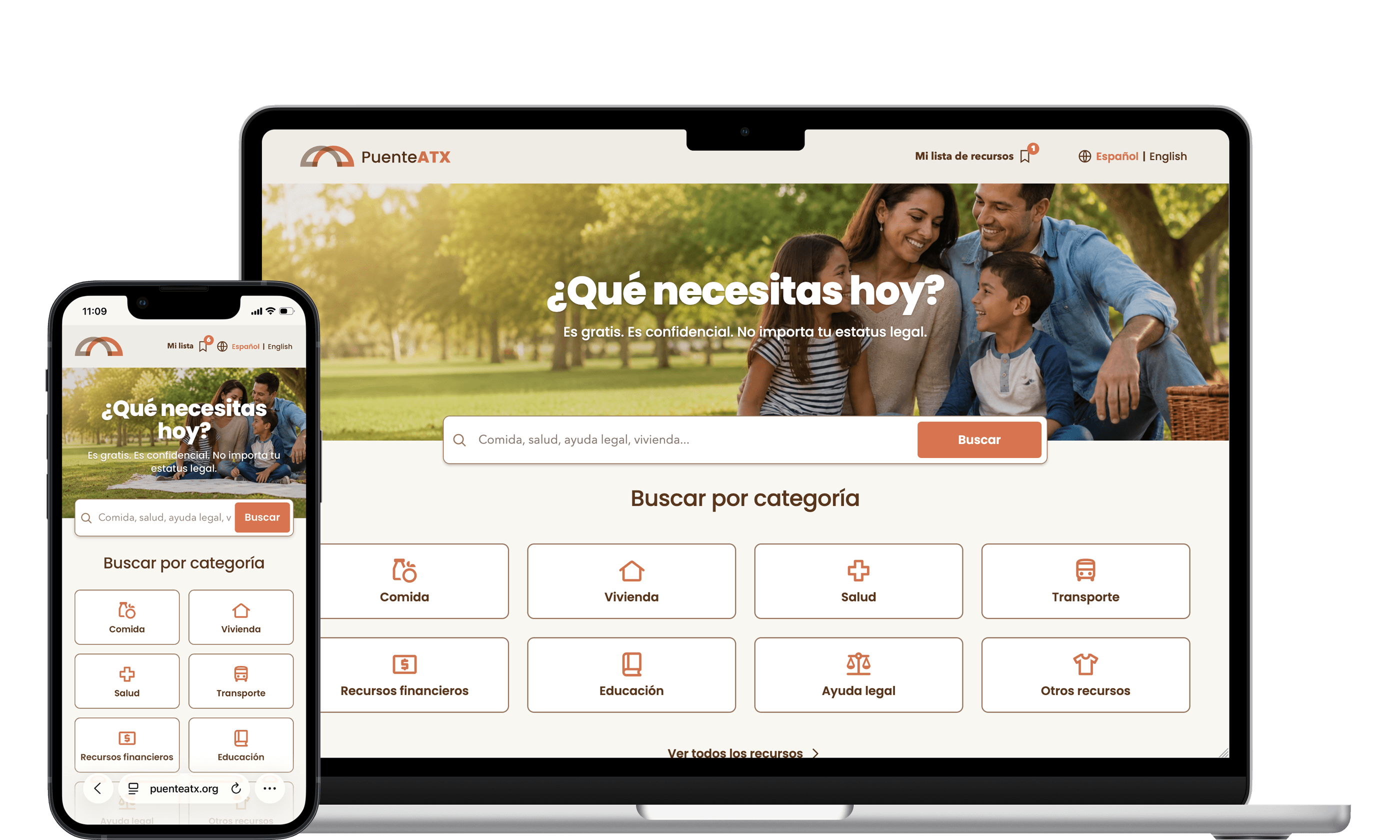 1440 × 720 — Homepage, desktop + mobile
The help exists. Finding it doesn't.
Food pantries, rental assistance, clinics, legal aid, school programs — across Central Texas the services are real and funded. The information about them is not. It lives in PDFs emailed between case workers, in Word documents last updated two years ago, in spreadsheets with dead phone numbers.
A family that needs rent help this week has to know which organization to call, whether they qualify, whether anyone there speaks Spanish, and whether the address on the flyer is still an address. The people doing the connecting — navigators, promotoras, church volunteers — were doing it from memory and paper.
Puente ATX came to us with a mission and nothing else: no brand, no site, no database, no name on a business card.
Four decisions that set everything else
Spanish first, English second
Not "Spanish available." The default locale is Spanish; English is the toggle. Every database field has an _es and an _en field, and the admin console flags a record when the second language is missing.
Phone first, often offline
The audience searches on a phone, sometimes on borrowed data. 44px minimum targets everywhere, a list that works when the map fails, and a real print stylesheet — because a navigator printing ten sheets for a Saturday clinic is a primary use case.
Trust is a design problem
A directory that lists a closed pantry is worse than no directory. Verification dates are visible, records older than 180 days get flagged, imports land as drafts, and the system will not invent a map coordinate it doesn't have.
No accounts, ever
Asking an undocumented family to register is asking them to leave. There is no login on the public site, and no personal data is stored about any visitor.
A warm system, not an institutional one
The reference point for "government services website" is institutional blue, gray tables and a tone that makes you feel processed. Puente ATX needed the opposite: it needed to feel like a neighbor gave you a phone number.
The palette is warm and earthed — a cream canvas, a deep brown ink instead of black, and a single terracotta accent that does all the pointing. Brown on cream reads at 9.75:1, so the warmth costs nothing in legibility. There is no second accent and no gradient anywhere in the product.
Ten tokens carry the whole thing: three surfaces, two ink values, two accent values, three border weights. They live as CSS custom properties in one file and map straight into the Tailwind theme — so the public site, the admin console and the map product cannot drift apart.
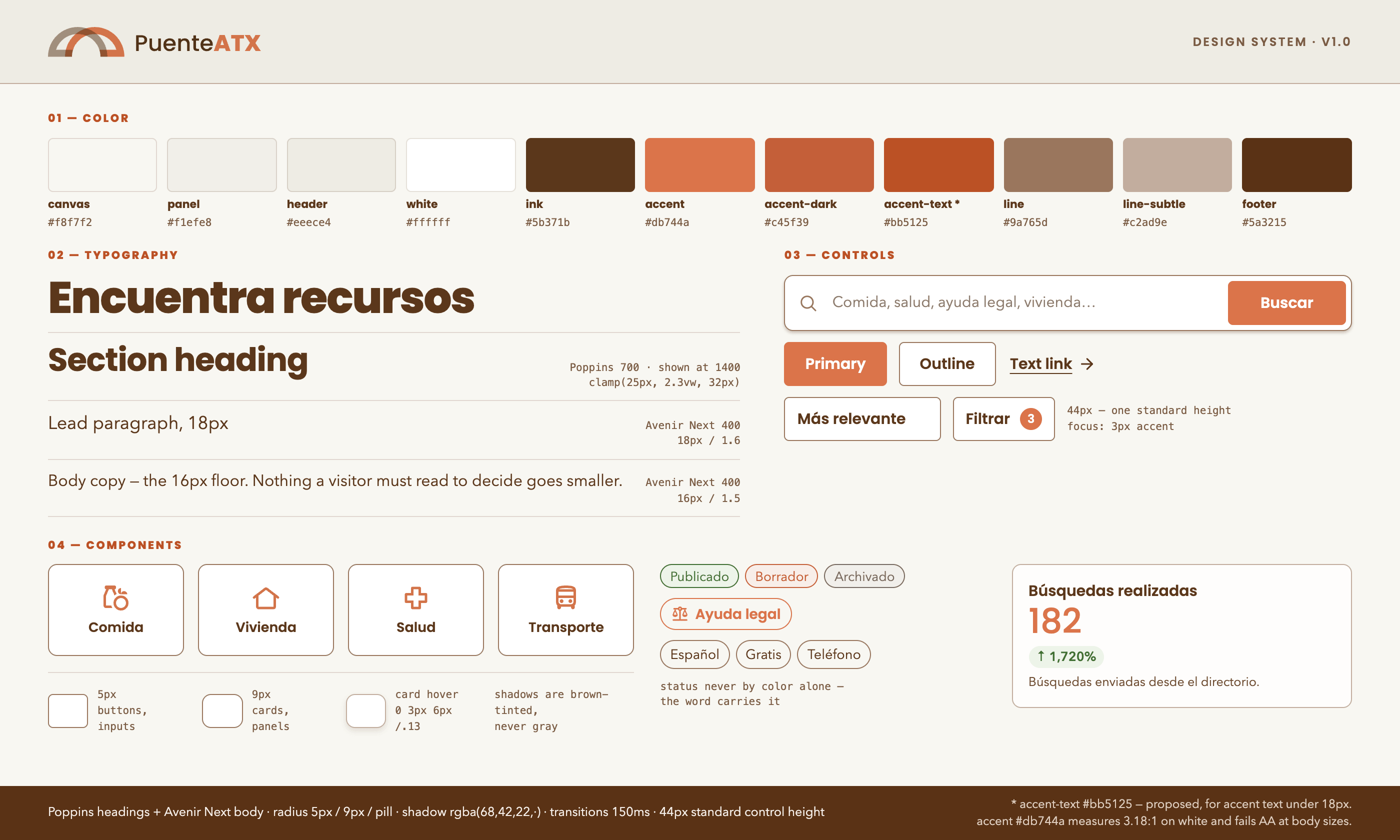 1440 × 810 — Design system board
Designed for how people actually search
Search that survives a real query. People don't type "housing." They type "no puedo pagar la renta." Search covers localized titles, organization names, summaries, descriptions, keywords, categories and service area in both languages — and every filter state lives in the URL, so a navigator can send a family a link to a filtered result set instead of instructions for reproducing one.
Saving without an identity. Saved resources live in the browser as a list of public slugs — no names, no email, no identifiers — and a list can be shared as a URL or a WhatsApp message containing nothing but those slugs. A shared list is previewed before import and never silently overwrites what someone already saved.
Pagination, not infinite scroll. Six results, then a button. Infinite scroll destroys the ability to print, to share a position, or to know how much is left — all of which this audience needs more than it needs smoothness.
Spanish sets the layout. Spanish runs roughly 20% longer than English, so every button, card and label was sized to the longer string first. Every responsive breakpoint in the product was set by Spanish, not English.
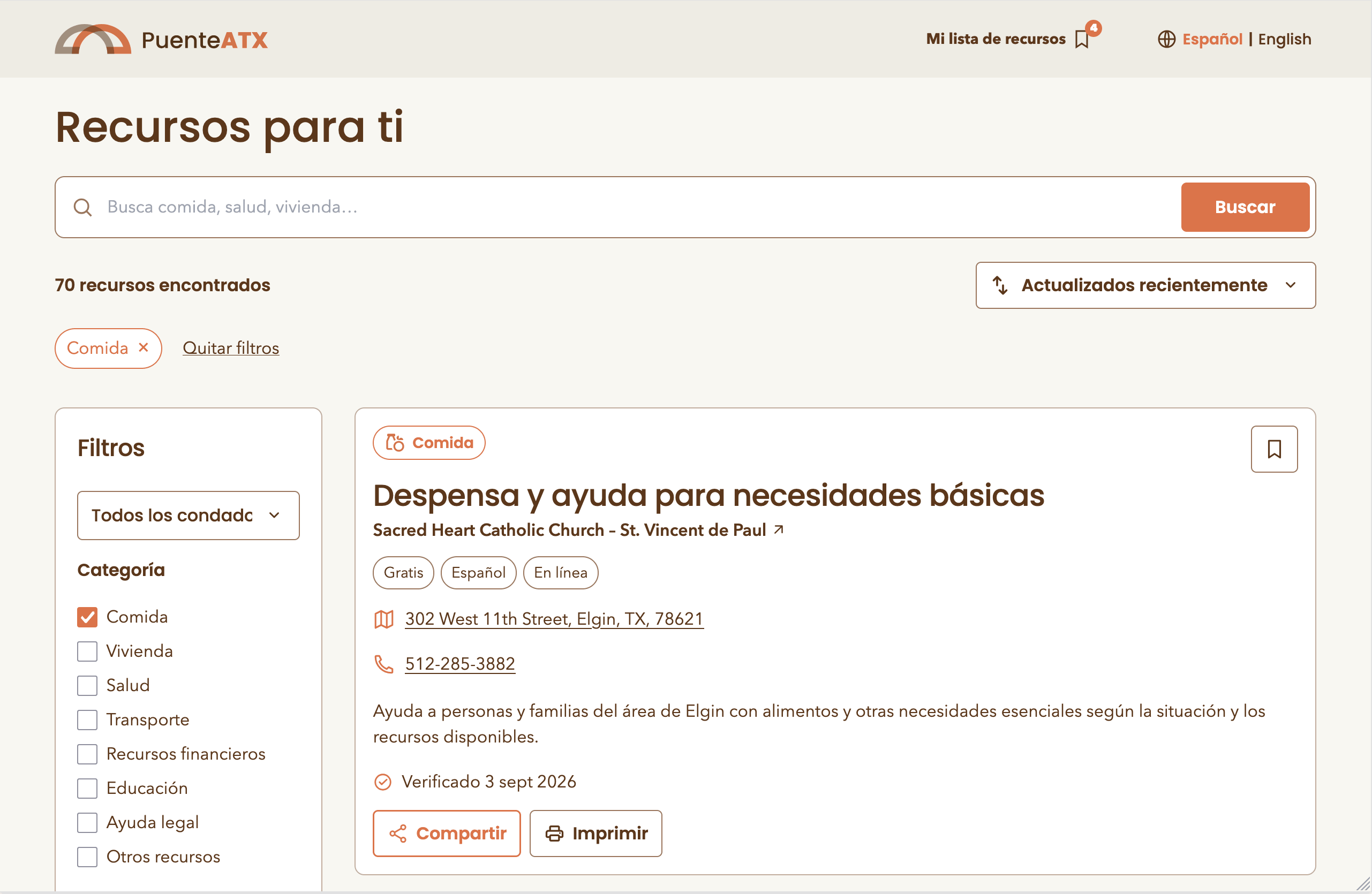 1440 × 900 — Results, filters, mobile sheet
Buscador: what's near me, right now
Halfway through, a distinct problem surfaced: search-by-keyword is the wrong interaction when the real question is "what is near me right now." So we built a second product on the same database and the same tokens.
Enter a ZIP code and an optional category; get the nearest resources with list and map synchronized, nearest first. The ZIP centroid becomes an approximate origin — generated from the U.S. Census 2024 Gazetteer and the 2020 ZCTA-to-County relationship file, covering 100 ZCTAs across Travis, Williamson, Bastrop, Hays and Caldwell counties — and the search expands through a radius ladder of 15 → 30 → 50 miles until it finds something.
The map is supplemental
The list holds every essential detail and stays usable when the tile provider is down. Desktop splits 38% list / 62% map; mobile toggles, with only one map instance ever mounted.
No invented coordinates
Every location is geocoded once, reviewed by a person, and stored with a status. Addresses without a unique match stay unpositioned — and the interface reports how many are pending review instead of dropping them quietly.
No vendor lock, no key in the browser
MapLibre GL with OpenFreeMap tiles — no paid Maps account, no private key shipped to the client, and a style URL swappable by environment variable.
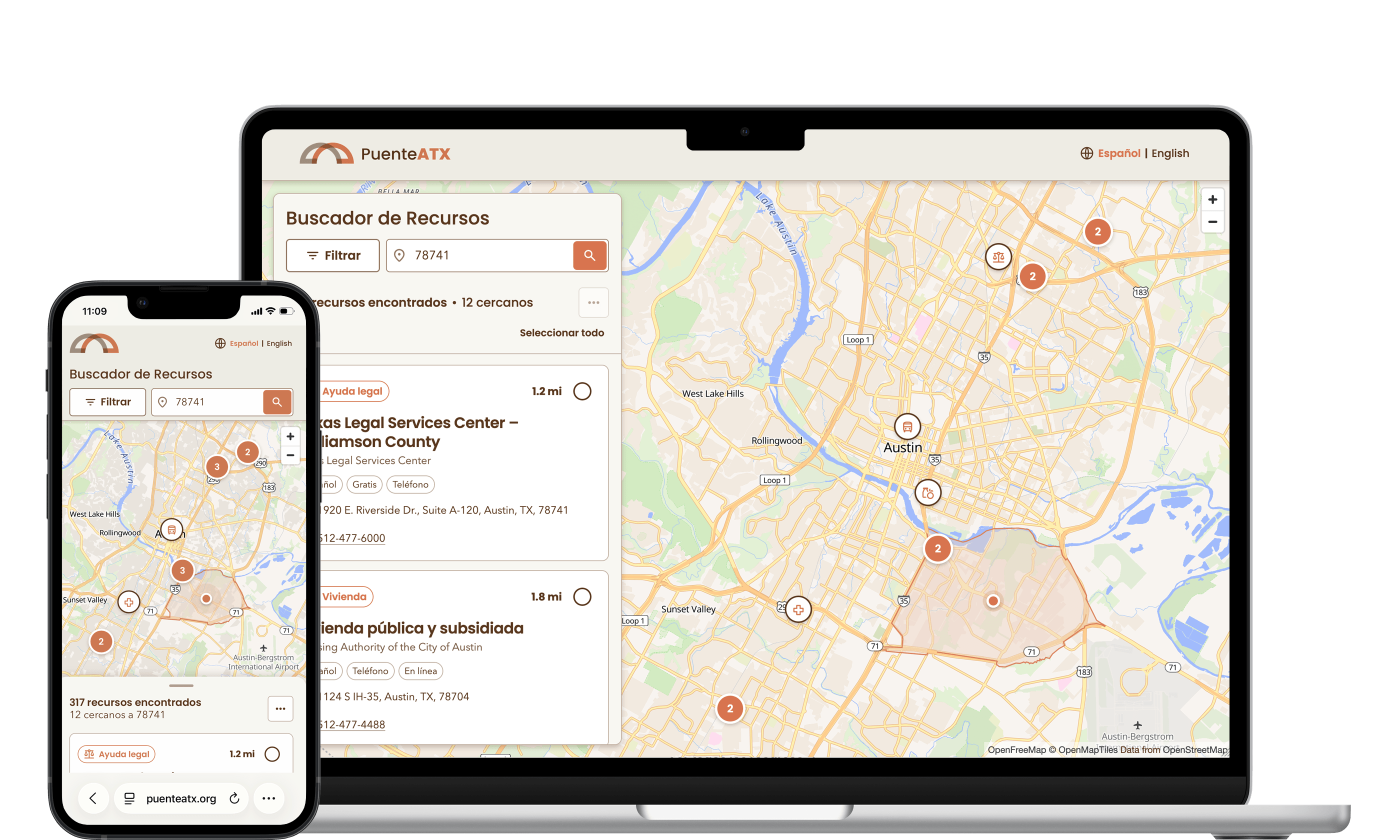 1440 × 900 — /buscador, desktop split view
Measuring need without surveilling people
Puente ATX needed to answer real questions — which categories people search, which areas generate the most searches, what people look for and don't find — in order to talk to funders and decide where to recruit resources next. For an immigrant-serving organization in Texas, that makes the analytics layer a safety question, not a growth question.
The constraint was written before the first event fired: the system must be unable to identify anyone, including by us.
- A closed allowlist16 approved events. No arbitrary names, no free-form fields. Adding one requires a code change, a database constraint and a data-dictionary entry.
- No writes from the browserEvents post to a serverless function that validates them, strips unknown properties and inserts with a server-only key. Public roles have zero privileges on the events table.
- Aggregates only on readTwo SECURITY DEFINER PostgreSQL functions verify the admin role and return aggregate JSON. Individual events never reach a browser.
- Anonymity thresholds in the databaseAn area appears on the map only with 20+ searches and 10+ distinct sessions behind it; a no-result term at 5+ occurrences. Suppressed counts never leave PostgreSQL — not to the dashboard, not to the CSV export.
- No third-party tilesThe needs map renders 63 local Census ZCTA polygons with recorded provenance. No API key, no basemap vendor, no request leaving the origin.
- Never storedNames, emails, phone numbers, addresses, GPS, IP addresses, full user agents, fingerprints, ad identifiers, conversation content.
Every metric is defined in a published data dictionary that states its formula, its source, its thresholds and — the part that matters — its limitations. "Contact actions" counts taps on a phone number. It does not measure whether anyone answered. The dashboard says so, on the dashboard.
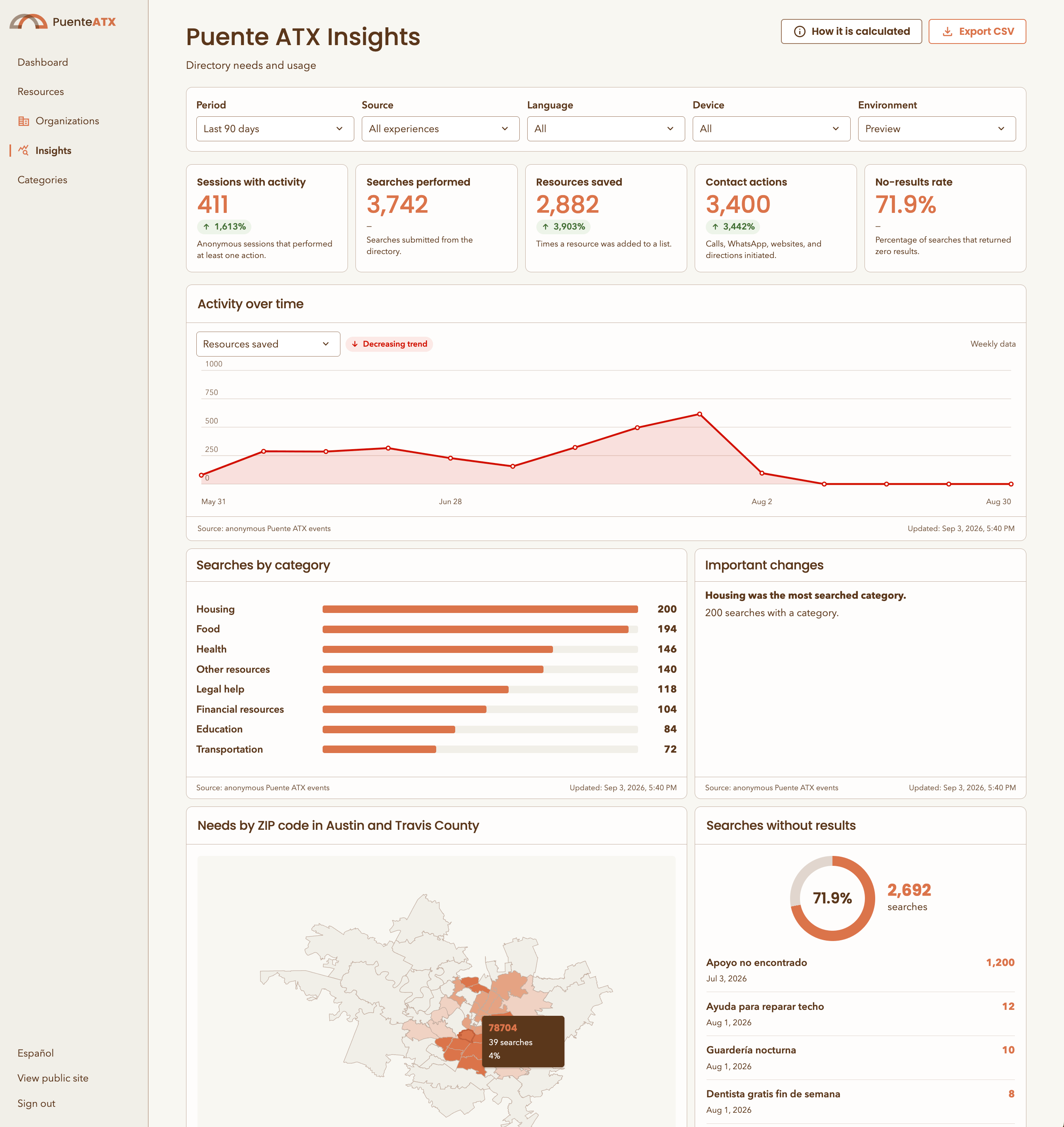 1440 × 900 — Insights dashboard
Spec first, then code
The implementation was written with Codex and Claude Code — but the leverage was never in generating code faster. It was in writing the specification first.
Every subsystem got a document before it got a component: the resource system, the finder, the analytics contract, the referral module, the map methodology. Those documents defined the data model, the routes, the security posture, the privacy thresholds and an explicit list of things the system must never do. The code was generated against them, and the documents stayed in the repository as the source of truth.
That inversion is what let a six-week scope survive contact with reality. When the dashboard needed a new metric, the change started in the data dictionary. When the finder needed a fifth county, the expansion procedure was already written down, in order, with the official data sources named.
The least glamorous piece was the most valuable: a review-and-import pipeline that turned eight community documents — a family resource guide, an eviction solidarity handbook, a counseling list, a healthcare catalog, a county roster — into roughly 440 validated bilingual records. Duplicates consolidated, URLs recovered from Excel hyperlink objects, missing Spanish translated, every record written as a "draft," and every import shipped with a report naming the judgment calls and what was deliberately left empty. Converting a document is not the same as verifying a fact, and the system says so.
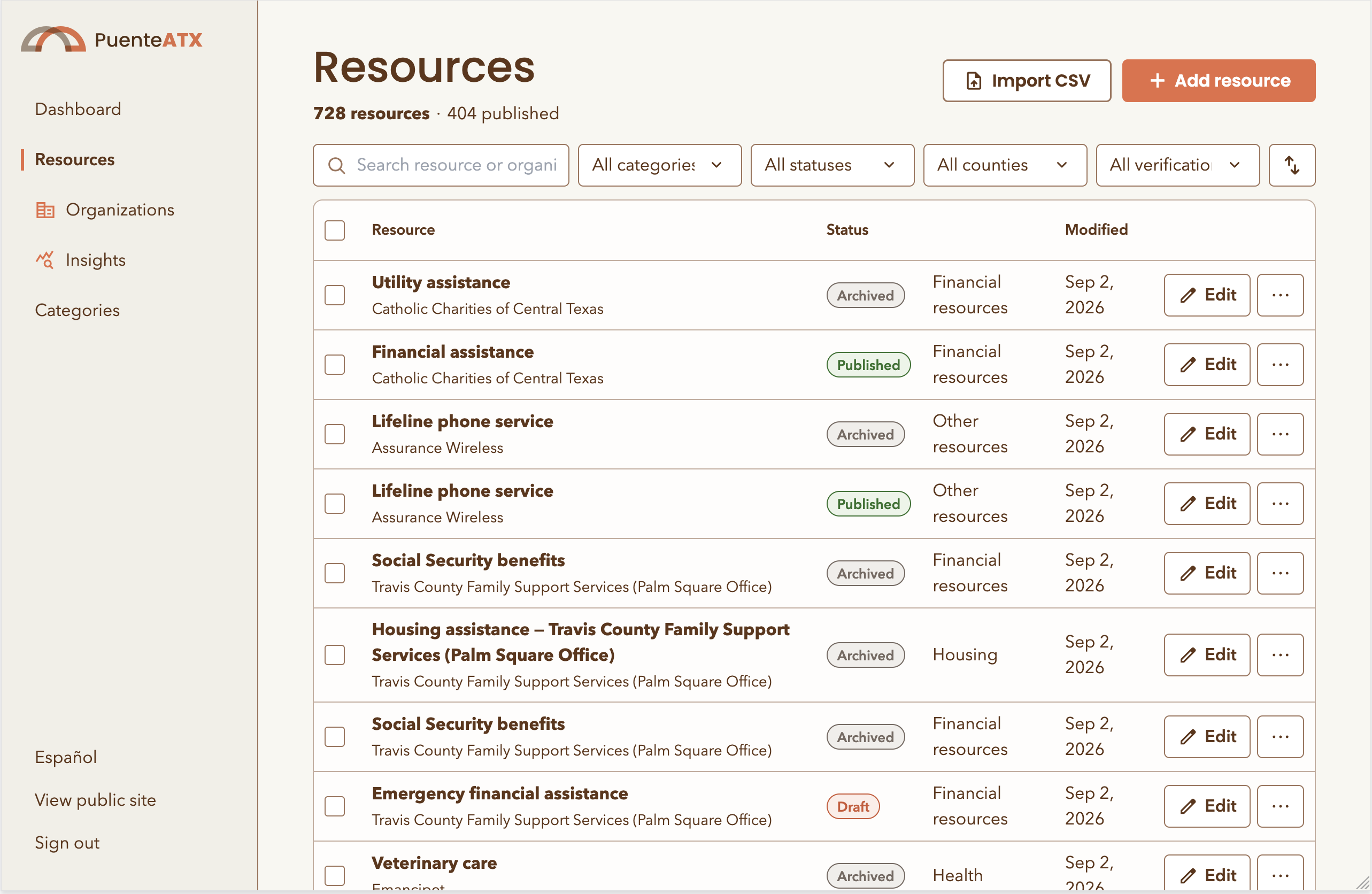 1440 × 810 — Admin console & CSV import
What shipped
"The bridge is only useful if people trust it will hold."
Every specification in this project has a section listing what the system must never do. That section, more than any feature list, is what kept a fast build from becoming a liability for the people it serves. Generation was never the hard part — deciding what the product should refuse to do was the work.